Product options and a live price calculator for WooCommerce.
Storelly Product Builder adds product options, a live price calculator and a visual builder to any WooCommerce product, plus B2B quotes and wholesale pricing. Free, with no product limits.
Free · No product limits · Requires WooCommerce
One plugin instead of three or four add-ons.
Options, a price calculator, a visual builder and B2B quotes in a single plugin, running on your own site.
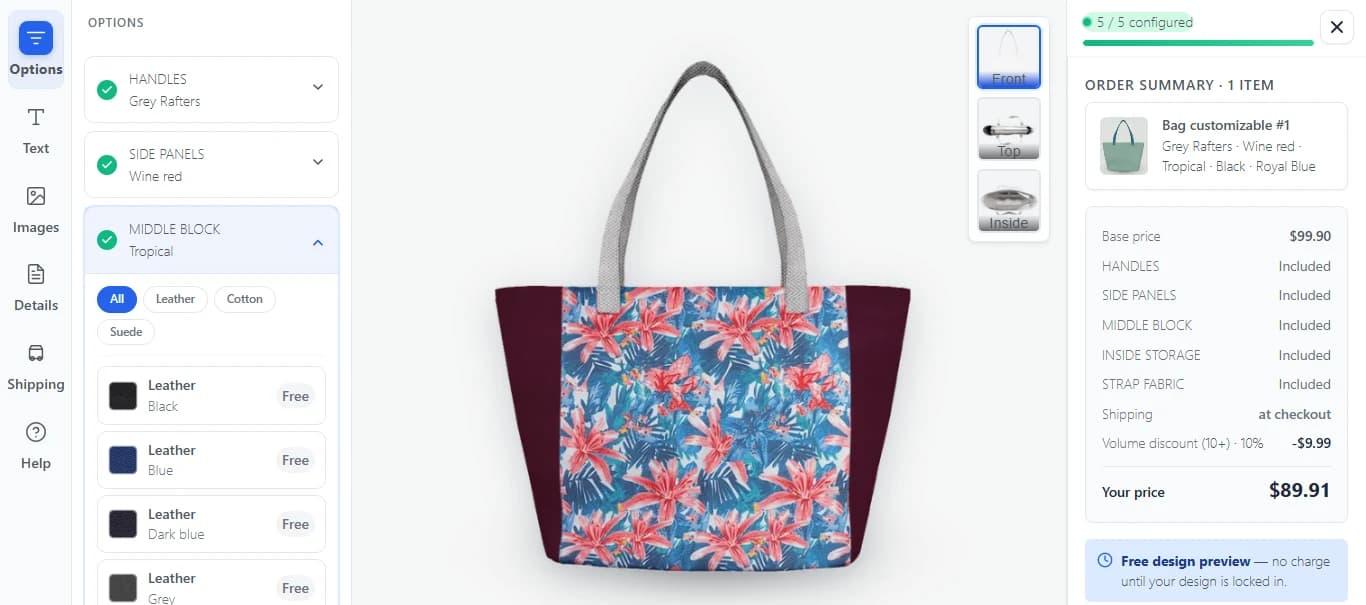
A visual product builder
Customers personalize a product on a live canvas: add text, upload images, pick colours and swatches, and see what they will get before adding to the cart.
Every field type you need
Dropdowns, radio buttons, image swatches, text inputs, checkboxes, file uploads and more, each option with its own price surcharge. Conditional logic shows only the options that matter.
Price calculator and quantity breaks
Tiered pricing that updates live as customers change the quantity and options. No cap on tiers or products in the free plugin.
B2B quotes
Customers request a quote, you reply with a priced quote, they accept it online and it becomes a normal WooCommerce order. Expiry dates and email notifications included.
Company accounts and wholesale pricing
Negotiated prices per company, assigned catalogs, team members with approval rules, and account credit with net payment terms.
Saved designs and reorders
Designs are stored on your own site, so a repeat order takes one click. Quotes and orders export to PDF locally, with no outside service.
Up and running in three steps.
Your cart and checkout stay your own WooCommerce.
Install the free plugin
In WordPress open Plugins → Add New and search for Storelly Product Builder, or get it from WordPress.org. WooCommerce must be installed and active.
Add options to a product
Edit any product, open the Storelly panel, add option groups, set the price of each option and publish. Start from a template if you want a head start.
Customers configure and order
The options appear on the product page with a live price. The cart and checkout stay your own WooCommerce.
Questions about Product Builder.
Can't find what you're looking for? Reach out and our team will walk you through it.
Yes. The plugin has no product limits, no caps on option groups, quantity tiers, quotes or company accounts, and no trial timer. Optional paid Storelly Cloud services add print-ready PDF rendering, an order sync and analytics dashboard, and a premium template library. They run on Storelly’s servers and never lock code on yours.
Yes. The plugin extends WooCommerce, so WooCommerce must be installed and active. Your existing cart, checkout, taxes and payment gateways keep working as before.
Edit the product and open the Storelly panel. Add option groups such as dropdowns, swatches, text fields or file uploads, set a price for each option, and publish. The options show on the product page with live price updates.
Yes. Set quantity-break tiers per product, for example 1 to 49, 50 to 99 and 100 or more, and the displayed price recalculates as the customer changes the quantity and options.
Yes. The visual builder lets customers add text, upload images, choose colours and templates, and preview the result before adding it to the cart. Their designs are saved on your site for reordering.
A customer submits a quote request from the product page. You review it in wp-admin, adjust the pricing and send the quote by email. The customer accepts it online and it converts into a WooCommerce order.
It works with block themes and classic themes, and with Elementor. It ships in 15 languages and supports right-to-left layouts.
Try it on your own WooCommerce store.
Install the free plugin from WordPress.org and add options to your first product in a few minutes.
Free · Requires WooCommerce